
How to Get Yotpo Reviews on Google Shopping
If you use Yotpo to collect reviews for your Shopify store, those reviews don't automatically appear as star ratings on your Google Shopping listings. Google Shopping needs a separate Product Ratings feed submitted to Google Merchant Center, and Yotpo doesn't send it for you. The fastest fix is to let Review2XML auto-sync your Yotpo reviews into a Google-compliant feed and connect it to Merchant Center in one click. Your first 50 reviews are free. This guide covers both the one-click method and the manual CSV method.
The fast way: one-click Yotpo auto-sync
Review2XML can pull your Yotpo reviews for you and push the feed straight into Merchant Center.
- Go to review2xml.com and enter your store URL. Review2XML auto-detects your business name, logo, and country.
- Choose Yotpo and paste your Yotpo App key and Secret key (in Yotpo: Settings → Store settings → API keys). Review2XML fetches your reviews and maps every field to Google's Product Ratings schema automatically.
- Click Connect Google Merchant Center and Review2XML pushes your feed straight in through Google's official Merchant API. (You also get a hosted feed URL if you'd rather paste a link.) Your feed then auto-syncs daily as new reviews come in.
Your first 50 reviews go live free, no credit card, and because Google needs 50+ reviews before it shows stars, the free tier is often all you need to get started.
Prefer a CSV? Export your reviews from Yotpo
If you'd rather upload a file, Yotpo lets you export your product reviews as a CSV from the Reviews dashboard.
- Go to reviews.yotpo.com and log in. If you land on the Loyalty or SMS app, use the app switcher in the top navigation to switch to the Reviews app.
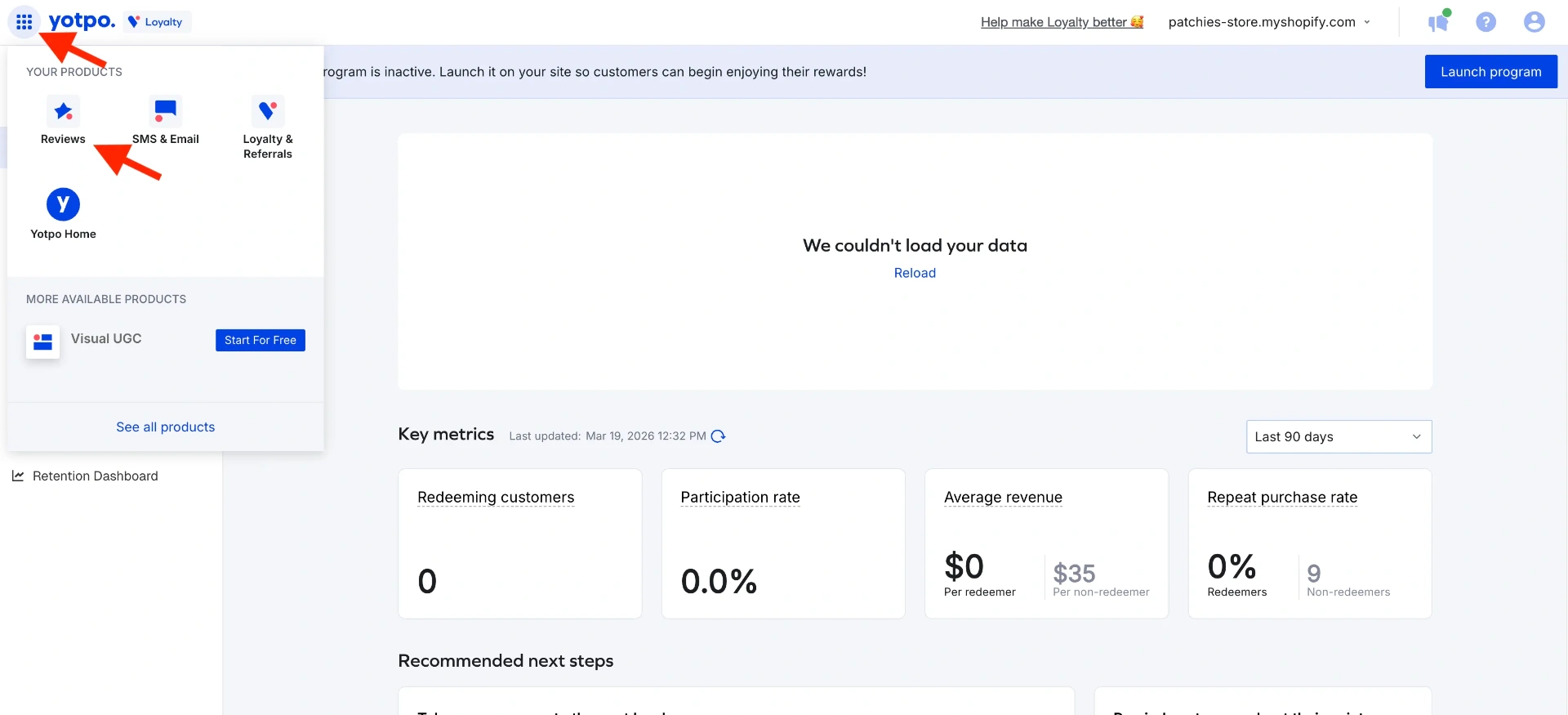
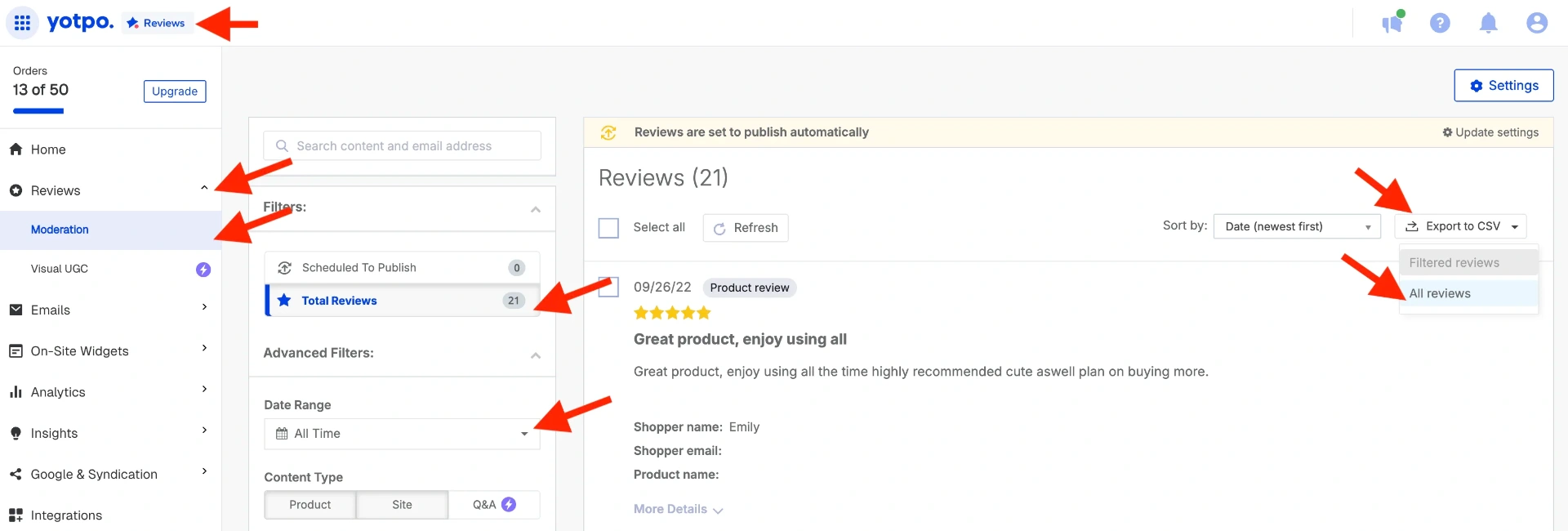
- In the left sidebar, click Reviews, then Moderation. Set the Date Range filter to All Time so you export your full review history, then click Export to CSV. Yotpo generates the file and emails it to the address registered on your Yotpo account.
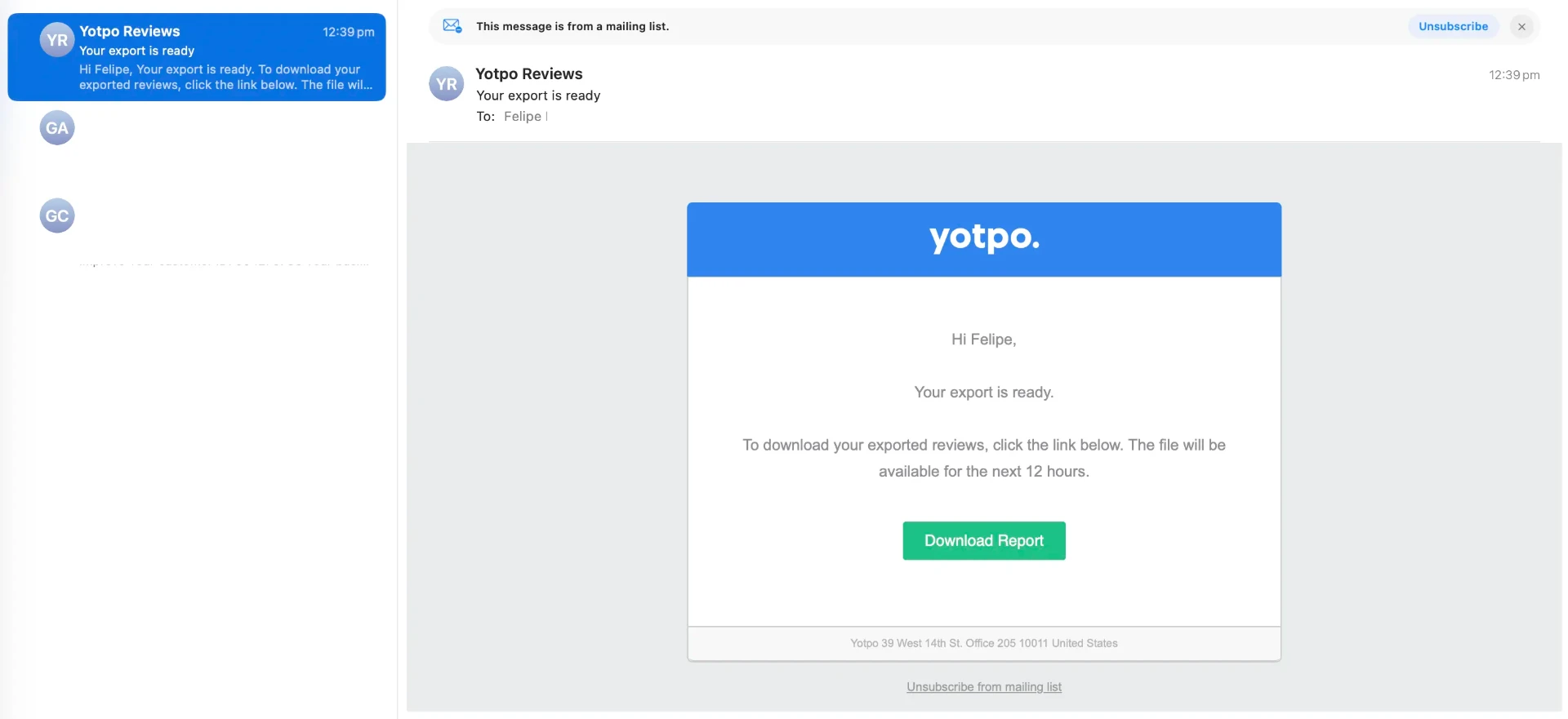
- Check your inbox (and spam) for the Yotpo export email and download the attached CSV.
Turn your CSV into a Google Product Ratings feed
Google Merchant Center doesn't accept a raw CSV. It needs a specific format called a Google Product Ratings XML feed, with required fields for each review: reviewer name, rating, review text, review date, and a product identifier such as a GTIN, MPN, or SKU. Upload your Yotpo CSV to Review2XML and it validates your data, auto-detects the Yotpo columns, and builds the feed for you. You can preview your product cards with their star ratings before anything goes live, and your first 50 reviews are free.
Add your feed to Google Merchant Center
However you connected your reviews, the feed goes into Google Merchant Center under Product Reviews. With Review2XML's one-click connect this is done for you. To add it manually:
-
Log in to Google Merchant Center and open your account.
-
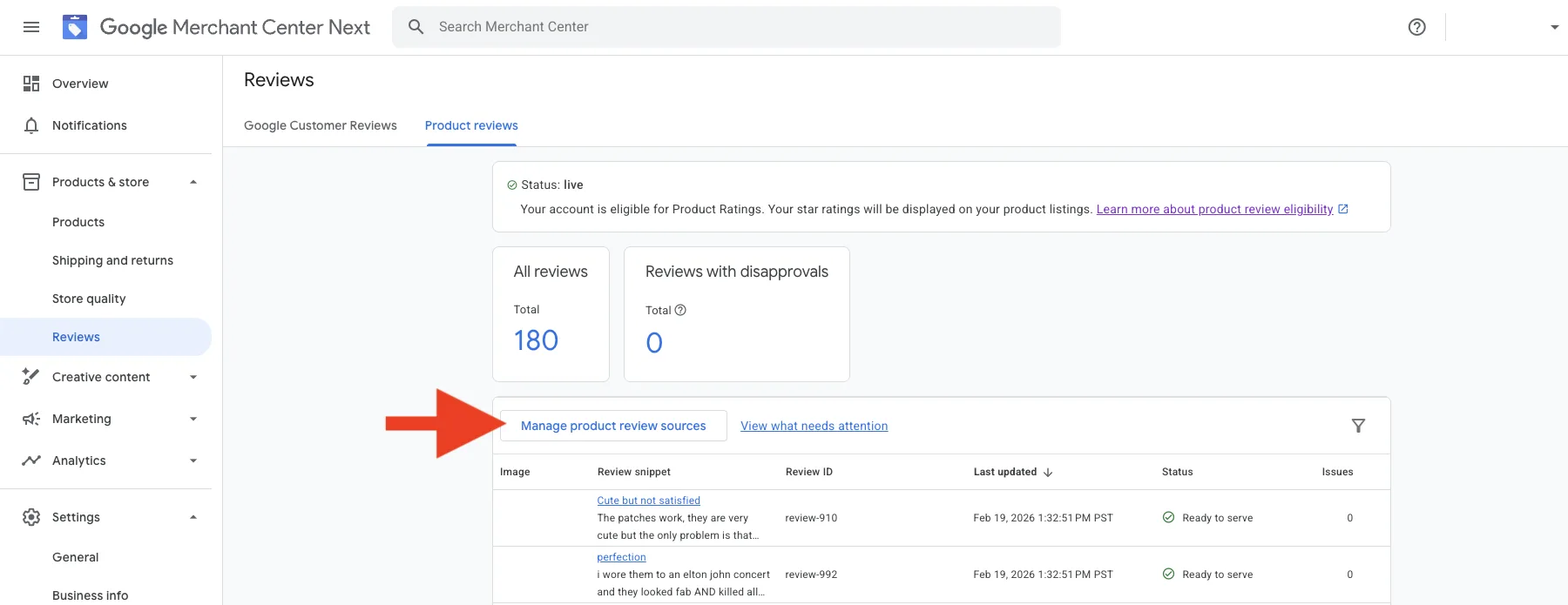
In the left menu, go to Products → Reviews → Product reviews.
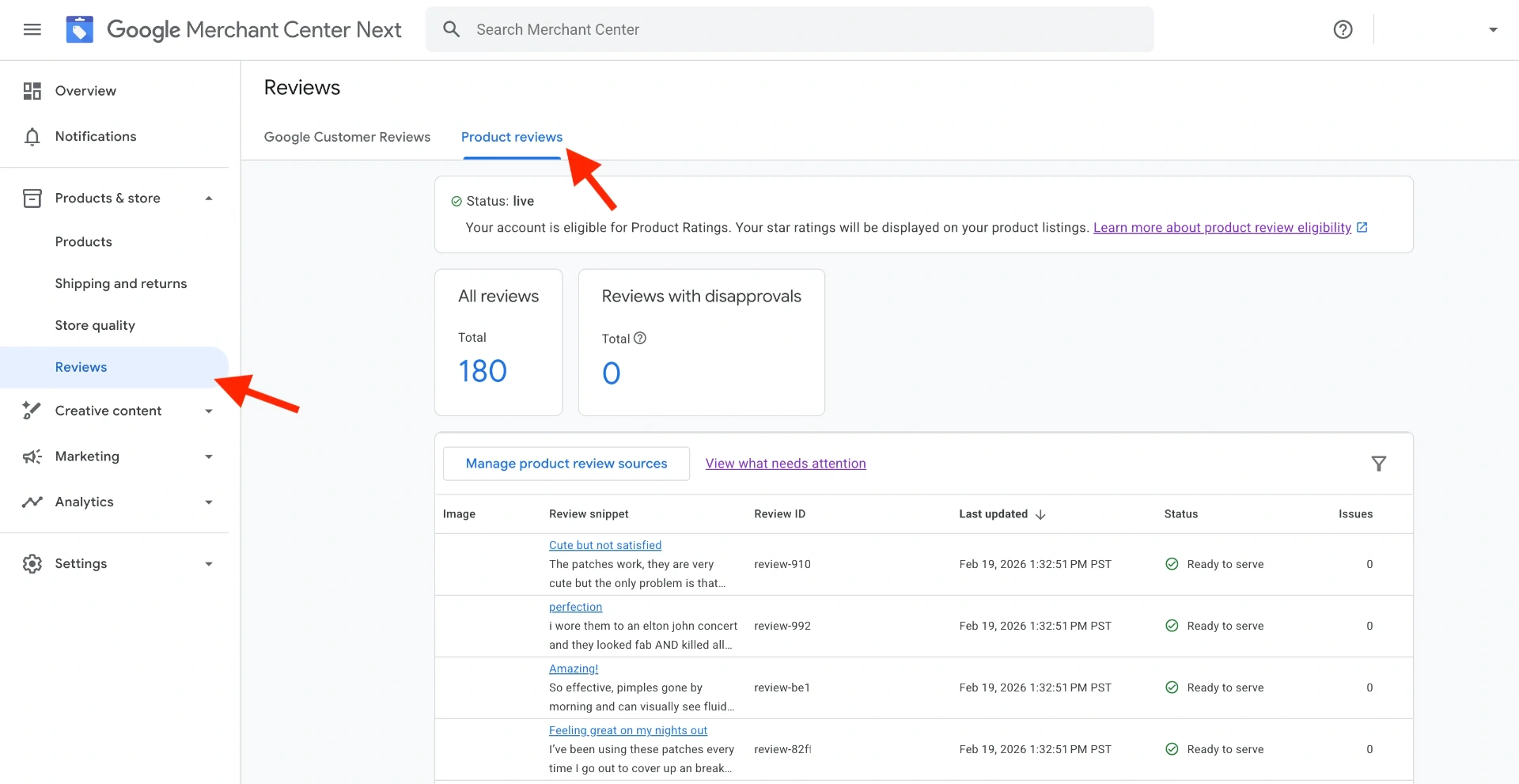
- Click Manage product review sources, then Add product review source.
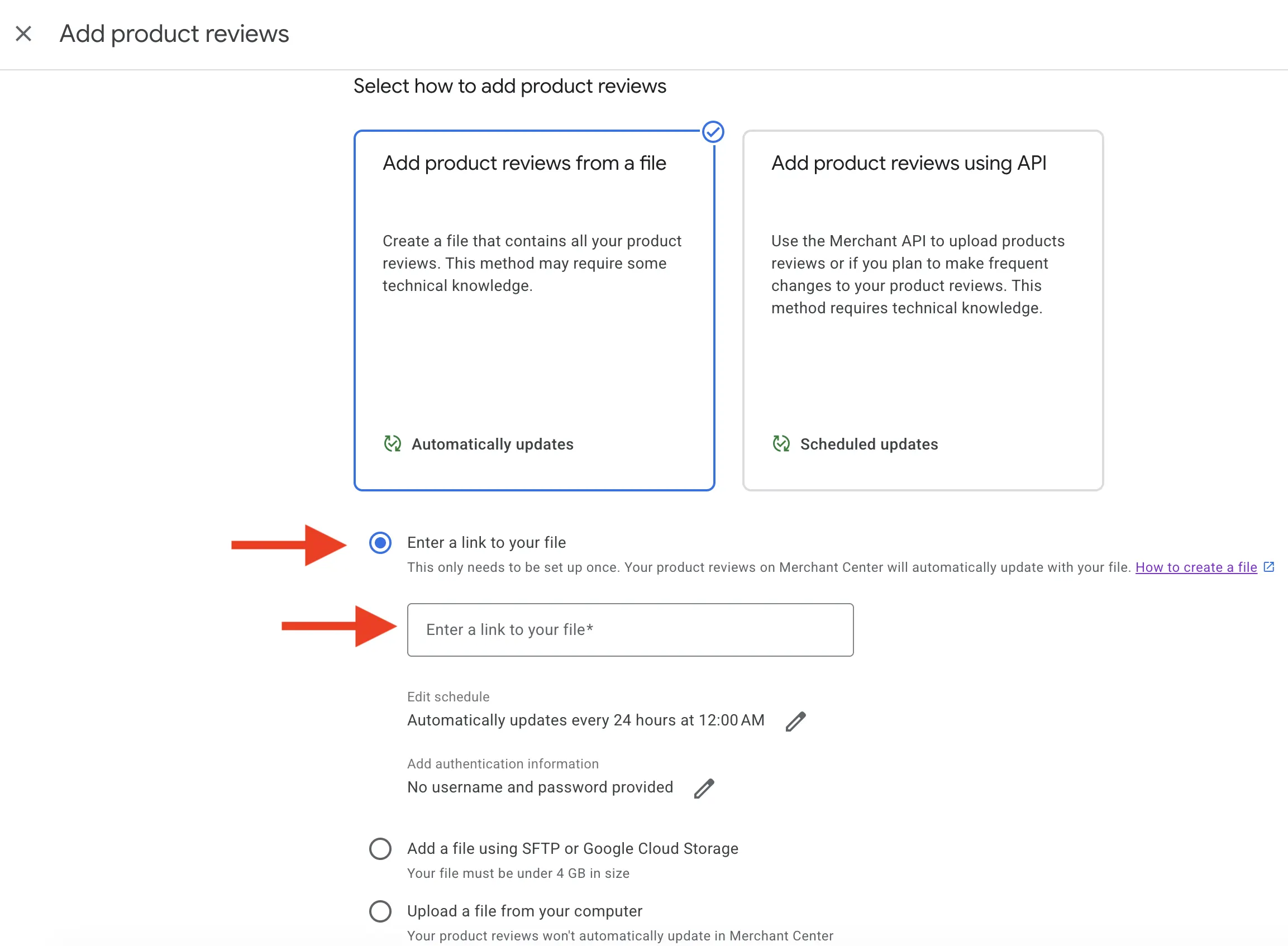
- Choose Enter a link to your file and paste your Review2XML feed URL. Because it's a hosted URL, Google re-fetches it automatically, so you never have to re-upload.
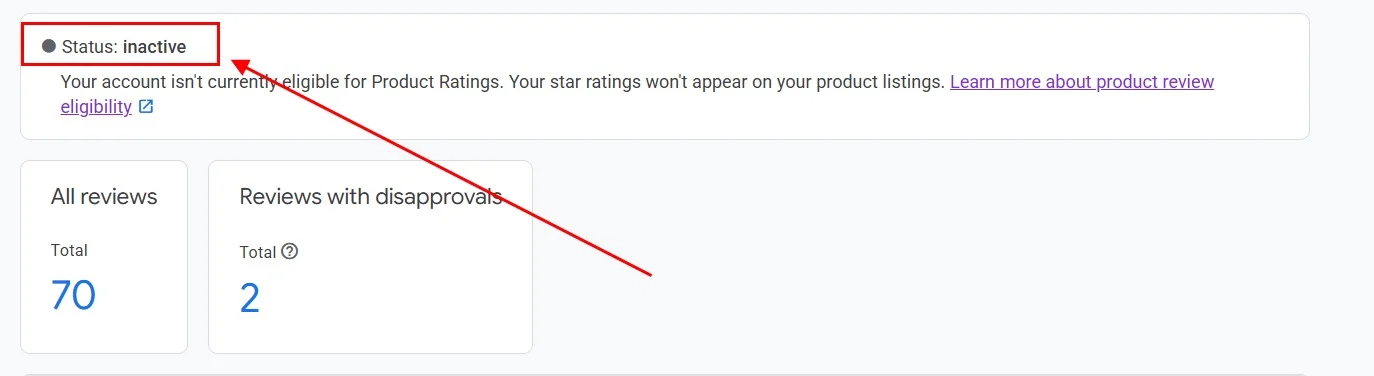
- The feed status shows Inactive while Google processes it. This is normal, and first submissions take 2 to 5 business days.
- Once approved, the status changes to Live and star ratings begin appearing on your Google Shopping listings.

Why this matters for your Google Shopping performance
Google Shopping listings with star ratings stand out in search results. Products with visible ratings tend to attract more clicks than listings without them, because shoppers use ratings as a quick quality signal before clicking through.
The stars on your Google Shopping ads come from your Product Ratings feed, not from your website. That's why the feed has to be submitted separately, even though your Yotpo reviews are already visible on your product pages.
Keeping your feed up to date
If you connected Yotpo by auto-sync, new reviews flow to Google automatically, every day, so there's nothing to do. If you used a CSV, upload a new one from your Review2XML dashboard and your hosted feed refreshes in place. There are no monthly manual re-uploads.
FAQ
Does Yotpo export all the review fields needed for Google Shopping? Yes. Yotpo's CSV export includes reviewer name, star rating, review body, review date, and product identifiers, and Review2XML maps these to the Google Product Ratings XML format automatically. If your products have GTINs in Yotpo, those are included too. With one-click auto-sync, Review2XML pulls the same fields directly from Yotpo, no export needed.
How long does it take for star ratings to appear on Google Shopping? After your feed is connected, Google typically takes 2 to 5 business days to review and approve it, then a few weeks for stars to appear across your listings. You need at least 50 product reviews across your store and enrolment in the Google Product Ratings program.
Do I need a paid Yotpo plan to do this? No. Review export and the API are available on all Yotpo plans, including the free tier. And on Review2XML your first 50 reviews are free, so you can get set up at no cost.
What if my Yotpo reviews don't include GTINs? GTINs are the preferred identifier, but they aren't required. If your reviews don't include GTINs, the product URL or SKU works as the identifier, and Review2XML supports all three. Feeds using GTINs tend to match products more reliably in Merchant Center.
Can I update the feed when I get new reviews? Yes, and with auto-sync it's automatic. Review2XML keeps your hosted feed up to date and Google re-fetches it, so you never touch it again. If you used a CSV, just upload a new one from your dashboard.
Found this helpful? See more of our guides on Google.
Add as preferred source on Google