
How to Get Loox Reviews on Google Shopping
If you use Loox to collect photo reviews on your Shopify store, you can bring those reviews onto Google Shopping, where they appear as star ratings beneath your product listings in search results. The good news: you don't have to build a feed by hand. Bring your Loox reviews into Review2XML (a CSV export or a Google Sheets link) and it builds a Google-compliant Product Ratings feed and connects it to Google Merchant Center in one click. Your first 50 reviews are free. Here is the full process.
What you need before you start
Three things get your Loox reviews showing on Google Shopping:
- A Loox account with at least some published reviews.
- A Google Merchant Center account (free at merchants.google.com).
- Review2XML, to turn your Loox reviews into the Google Product Ratings feed and connect it to Merchant Center.
Google requires a minimum of 50 reviews across your store before star ratings appear. If you have fewer, you can still complete the setup and Google will start showing stars once you cross the threshold. On Review2XML your first 50 reviews are free, so you can get set up at no cost.
How to export your reviews from Loox
Loox stores your review data inside your Shopify account and lets you download it as a CSV.
Step 1: Open Loox from your Shopify Admin
Log in to your Shopify Admin, click Apps in the left sidebar, and open Loox from your installed apps list.
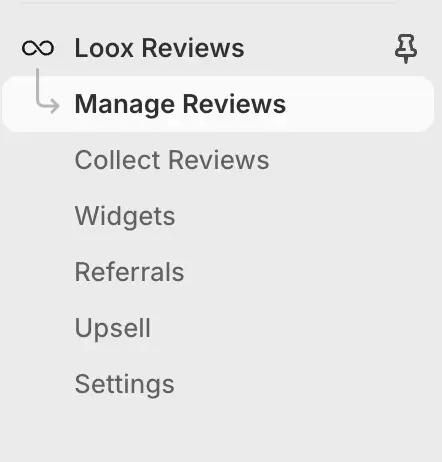
Step 2: Go to Reviews and export as CSV
Inside Loox, open the Reviews section and click the export button (labelled Export to CSV, or available via the options menu) to download your review data.
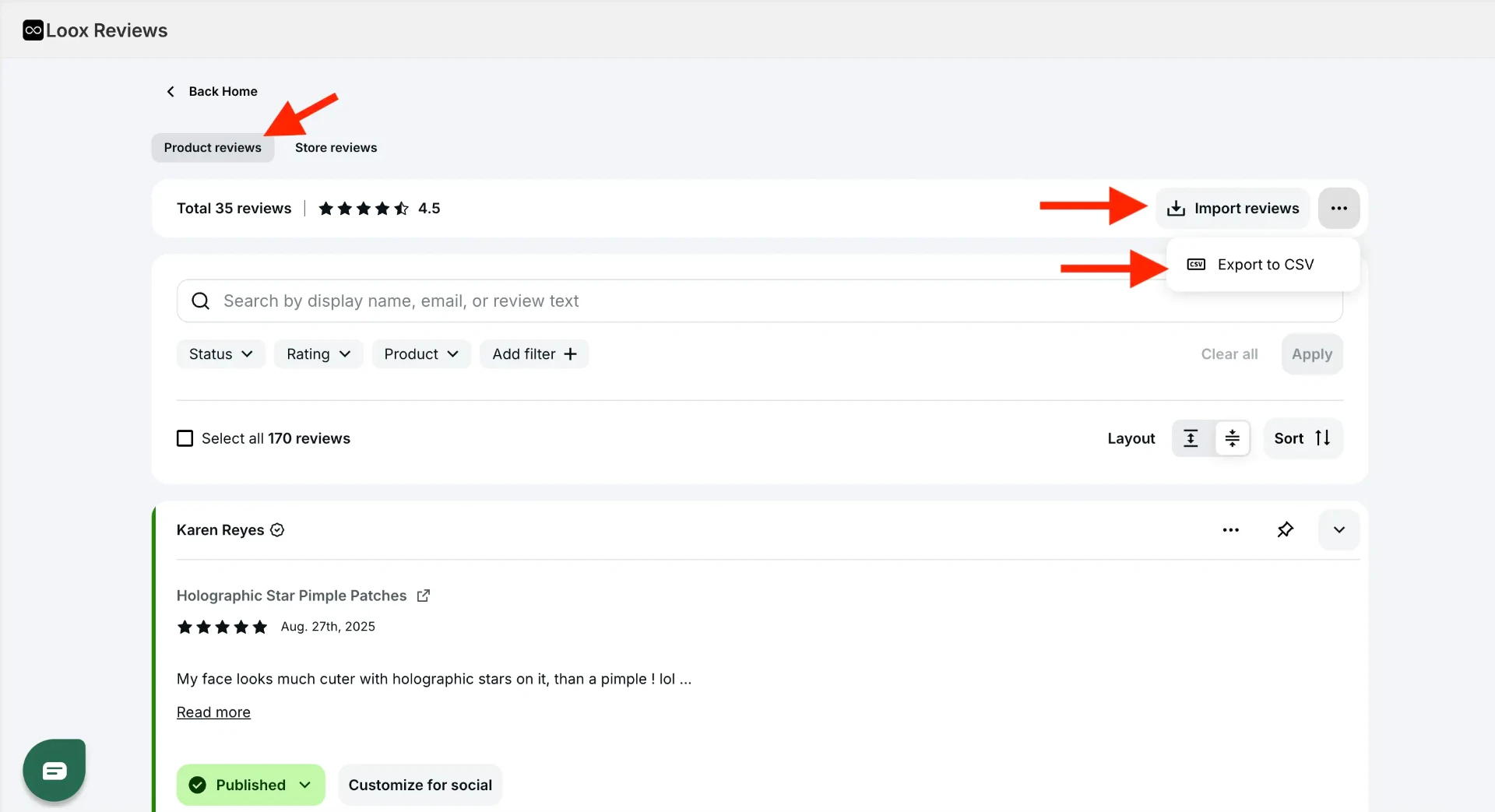
Depending on your Loox version, the file downloads immediately or is emailed to you. It contains reviewer name, rating (1 to 5), review body, product ID (or handle), and review date.
A note on photo reviews: Loox exports include photo URLs alongside each review. These can be included in your Google Product Ratings feed, and Google may display them on your Shopping listings, giving your products extra visual credibility.
Turn your Loox reviews into a Google Product Ratings feed
Google Merchant Center doesn't accept a plain CSV. It needs a specific format called the Google Product Ratings feed, and Review2XML builds it for you.
- Go to review2xml.com and enter your store URL. Review2XML auto-detects your business name, logo, and country.
- Add your reviews: upload your Loox CSV, or paste a Google Sheets link. Review2XML reads the file, auto-detects your columns (reviewer name, rating, review text, product identifier), and maps them to Google's schema automatically. (One-click Loox auto-sync via the Loox API is on the way; for now the CSV or Sheets route takes about a minute.)
- Preview your product cards with their star ratings, then your first 50 reviews go live free.
Add your feed to Google Merchant Center
Through Google's official Merchant API, Review2XML can push your feed straight into Merchant Center in one click. To add it manually instead:
-
Log in to Google Merchant Center and open your account.
-
In the left sidebar, go to Products → Reviews → Product reviews.
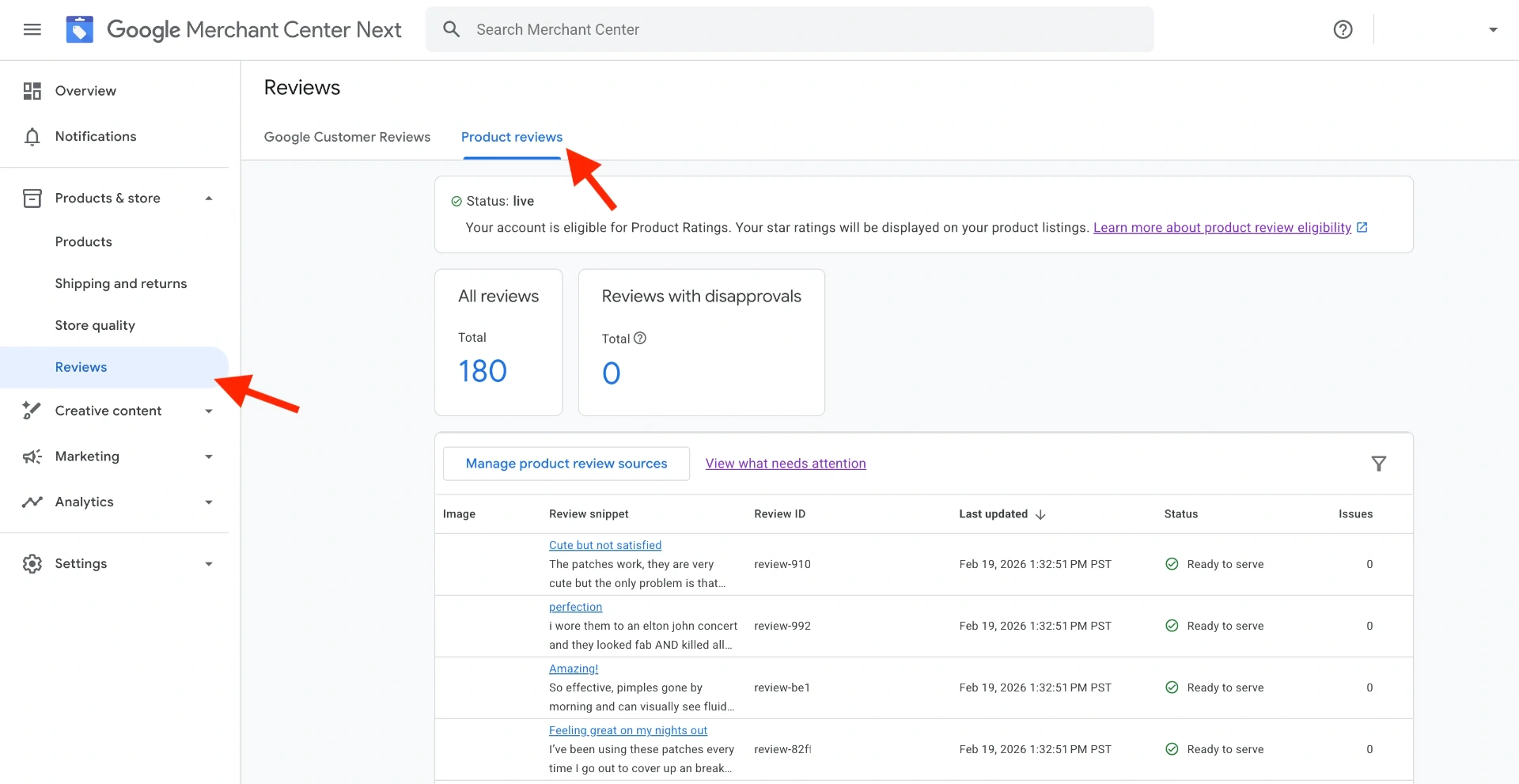
- Click Manage product review sources, then Add product review source.
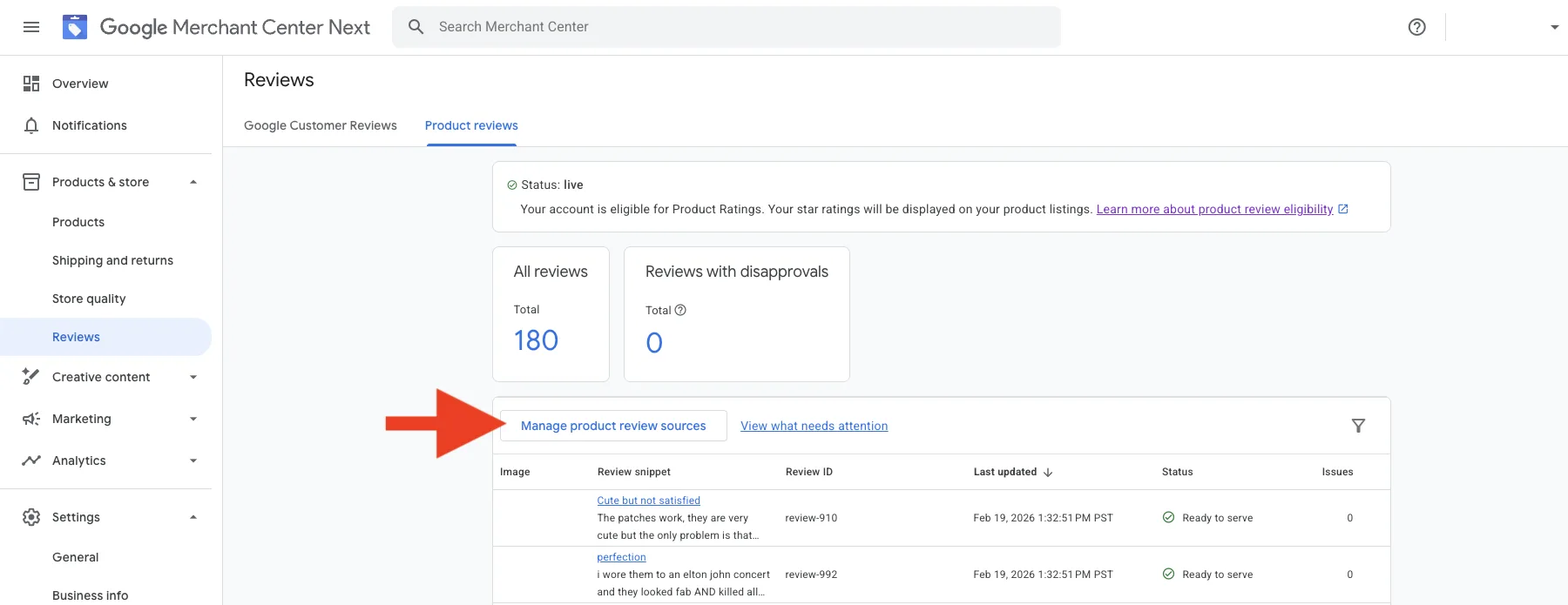
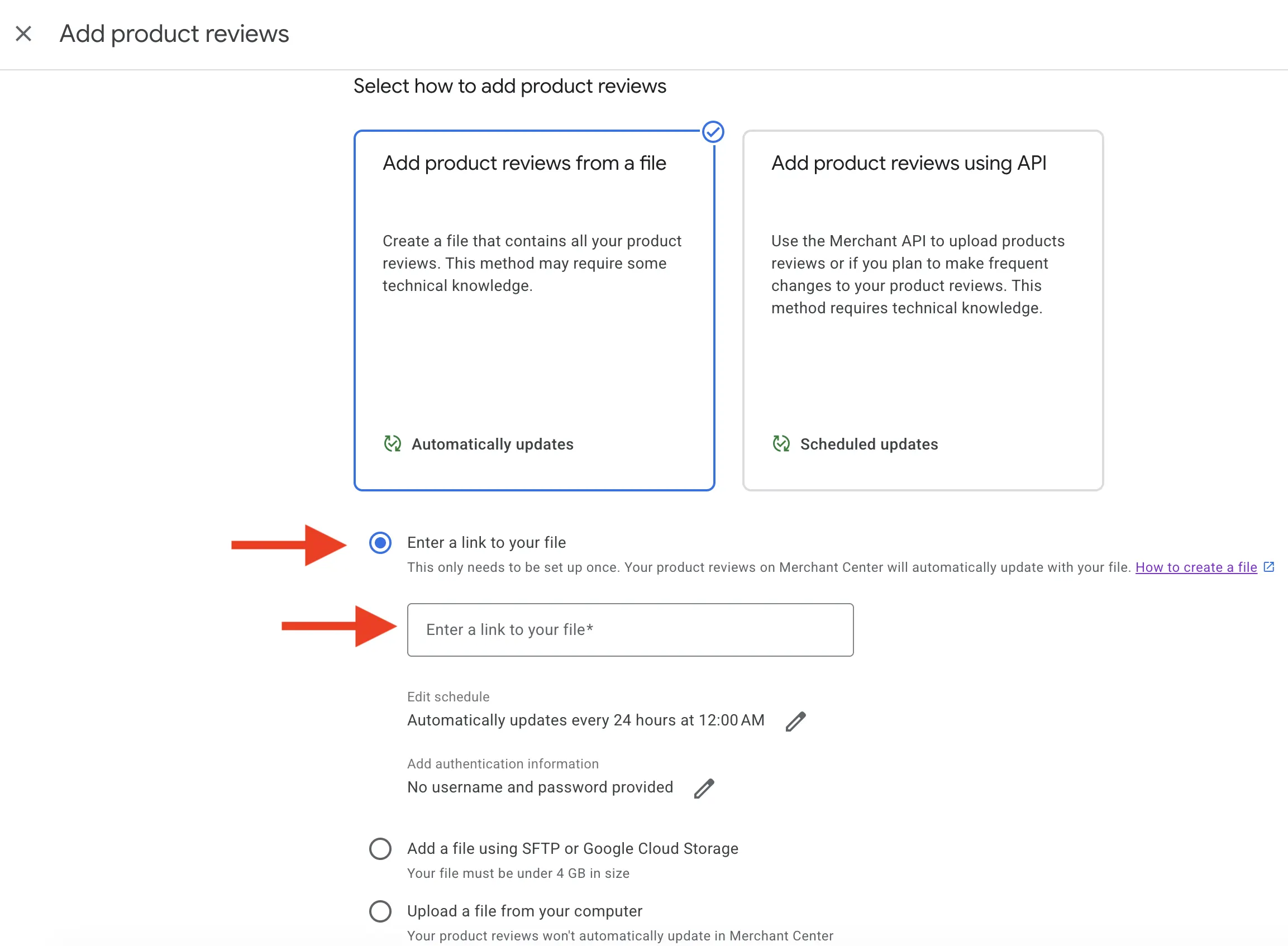
- Choose Enter a link to your file and paste your Review2XML feed URL. Because it's a hosted URL, Google re-fetches it automatically, so you never have to re-upload.
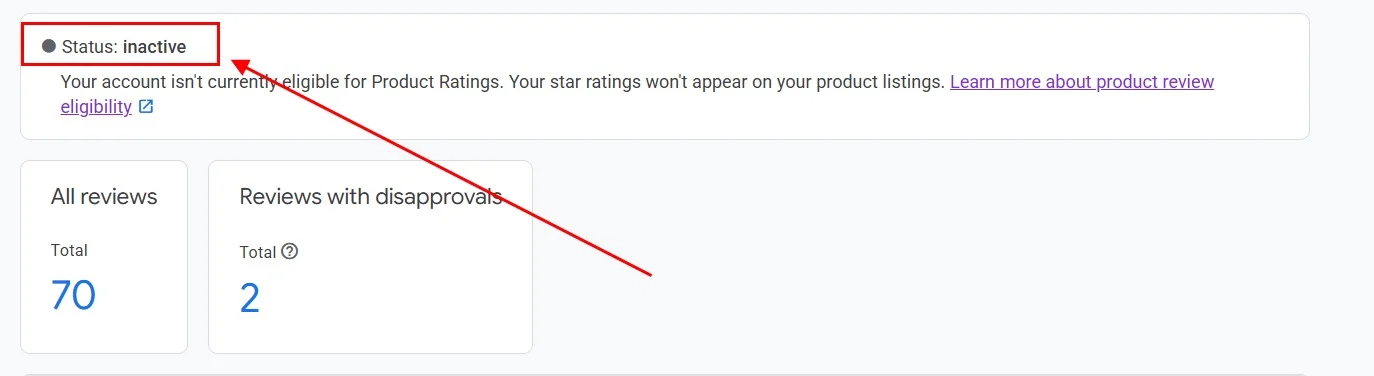
- The feed shows an Inactive status while Google reviews it. This is normal and usually takes 24 to 72 hours.
- Once approved, the status changes to Live, and star ratings begin appearing on your Google Shopping listings within a few days.

FAQ
Does Loox have a built-in Google Shopping integration for reviews? Loox doesn't produce a Google Product Ratings feed on its own. You bring your Loox reviews into Review2XML (a CSV export or a Google Sheets link), and it builds the feed and, through Google's official Merchant API, connects it to Merchant Center in one click. The whole thing takes a few minutes.
Will my Loox photo reviews show on Google Shopping? Your Loox export includes photo URLs for each review, and these can be included in your Product Ratings feed. Whether Google displays the photos depends on its own criteria, but including them gives you the best chance.
How many reviews do I need for Google Shopping stars? Google requires a minimum of 50 product reviews across your store. You can upload your feed sooner and Google will start displaying stars once your count crosses the threshold. Your first 50 reviews on Review2XML are free.
How often do I need to refresh my feed? You don't need to re-upload every month. Your Review2XML feed is a hosted URL that Google re-fetches automatically, so when you collect new reviews you upload the latest export from your dashboard and the live feed updates in place.
What if my Loox product IDs don't match my Google Shopping product IDs? Google matches reviews to listings using the product's GTIN, MPN, or product URL. If your Loox export uses Shopify product handles rather than GTINs, Review2XML can match on the product URL so reviews are attributed to the right products.
Found this helpful? See more of our guides on Google.
Add as preferred source on Google