
Get Google Shopping Reviews on Shopify in 3 Clicks
Getting your product reviews onto Google Shopping used to mean exporting a CSV, converting it to XML, and uploading that file to Google Merchant Center by hand. The new Review2XML Shopify app removes those steps. You can connect your reviews and show star ratings on Google Shopping in about three clicks, without leaving your Shopify admin. This post walks through how it works and who it is for.
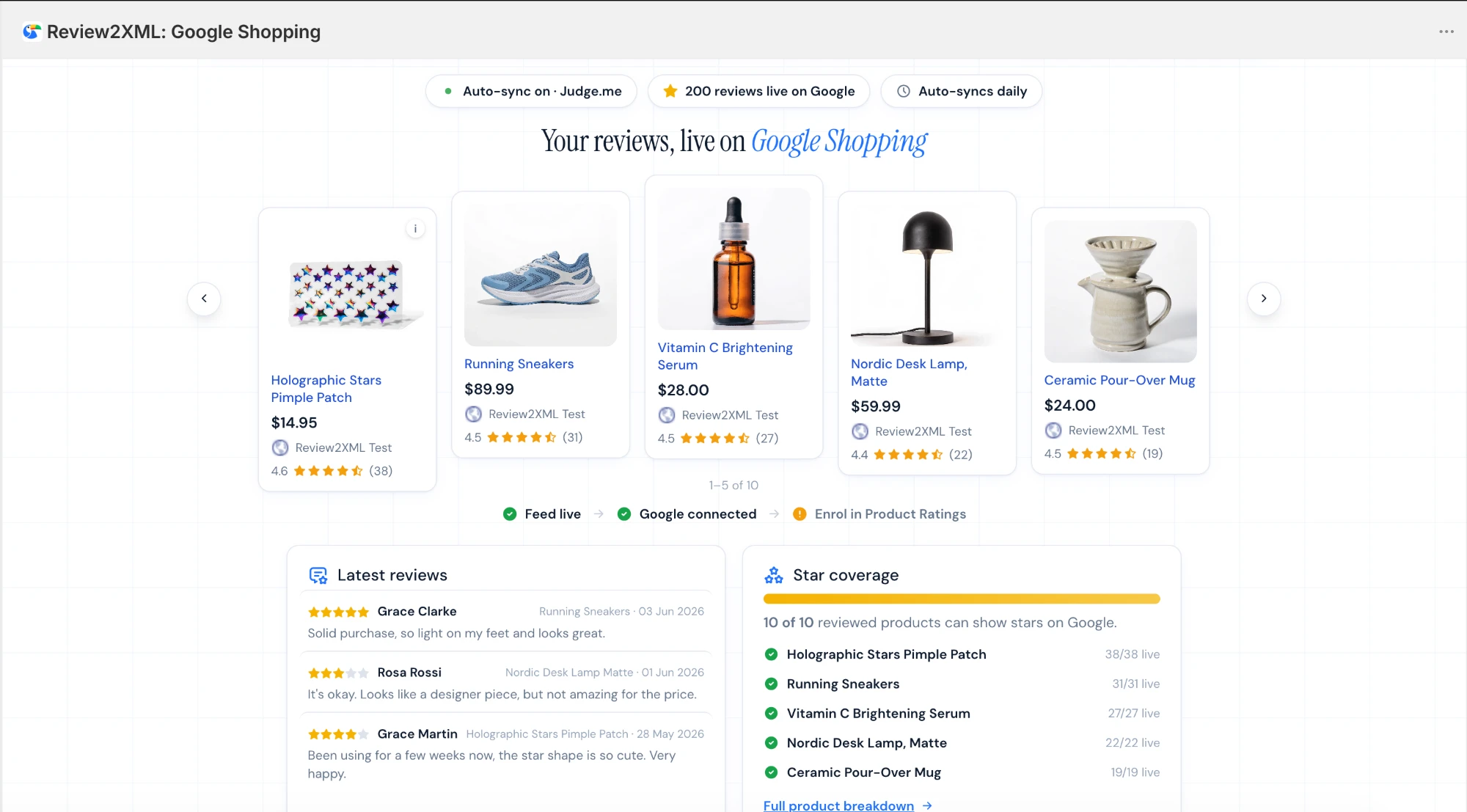
Why Star Ratings on Google Shopping Are Worth It
When your products show a star rating on Google Shopping, shoppers can see your score before they ever click. Those small stars do a lot of quiet work. They signal that other people have bought the product and rated it, they make your listing stand out next to competitors with no ratings, and they tend to lift click-through rates on both your free listings and your paid Shopping ads. Higher click-through can also make your ad budget go further, because more of the people who see your listing choose it. For a small store competing with bigger names, stars are one of the few signals you can add quickly that shoppers actually notice.
The Old Way vs the New Way
The manual method still works, and plenty of stores use it. You export reviews from your review app, run the CSV through review2xml.com to get a Google ready XML feed, then paste that feed into Google Merchant Center. It is reliable, but it is a few steps, and you repeat parts of it whenever you gather new reviews.
The app collapses all of that into a setup you do once. You connect your review source, you connect Google Merchant Center, and from then on your reviews flow to Google and stay updated. No repeated exports, no file juggling.
The 3 Clicks
Here is the whole setup, start to finish.
1. Install the app
Find Review2XML on the Shopify App Store and install it on your store. It opens right inside your Shopify admin, so there is no separate account to create and no new dashboard to learn.
2. Connect your reviews
Pick where your reviews live. Judge.me, Yotpo, and a Google Sheets link connect automatically, so the app pulls your reviews for you. If your reviews are somewhere else, you can upload a CSV and the app handles the rest. Either way, the app turns your reviews into the exact feed format Google requires.
3. Connect Google Merchant Center
Click connect and sign in to your Google Merchant Center account. The app pushes your reviews to Google for you, so there is no feed URL to copy and no file to upload. Once Google approves the reviews, your star ratings start appearing on your Shopping listings.
After those three steps the app keeps working in the background. When you collect new reviews, they sync through to Google without you touching anything.
Built for Shopify
Review2XML - Google Shopping is officially Built for Shopify, Shopify's highest quality status for apps. Shopify only awards it to apps that meet its standards for performance, design and integration, and it keeps checking them after that. For you, it means the app is fast, easy to use and fits naturally into your Shopify admin.
What the App Does for You
Beyond the initial connection, the app is built to keep your Google Shopping stars accurate and healthy:
- Automatic syncing from your connected review source, so your feed stays current
- A direct push to Google Merchant Center, which replaces the old copy and paste feed step
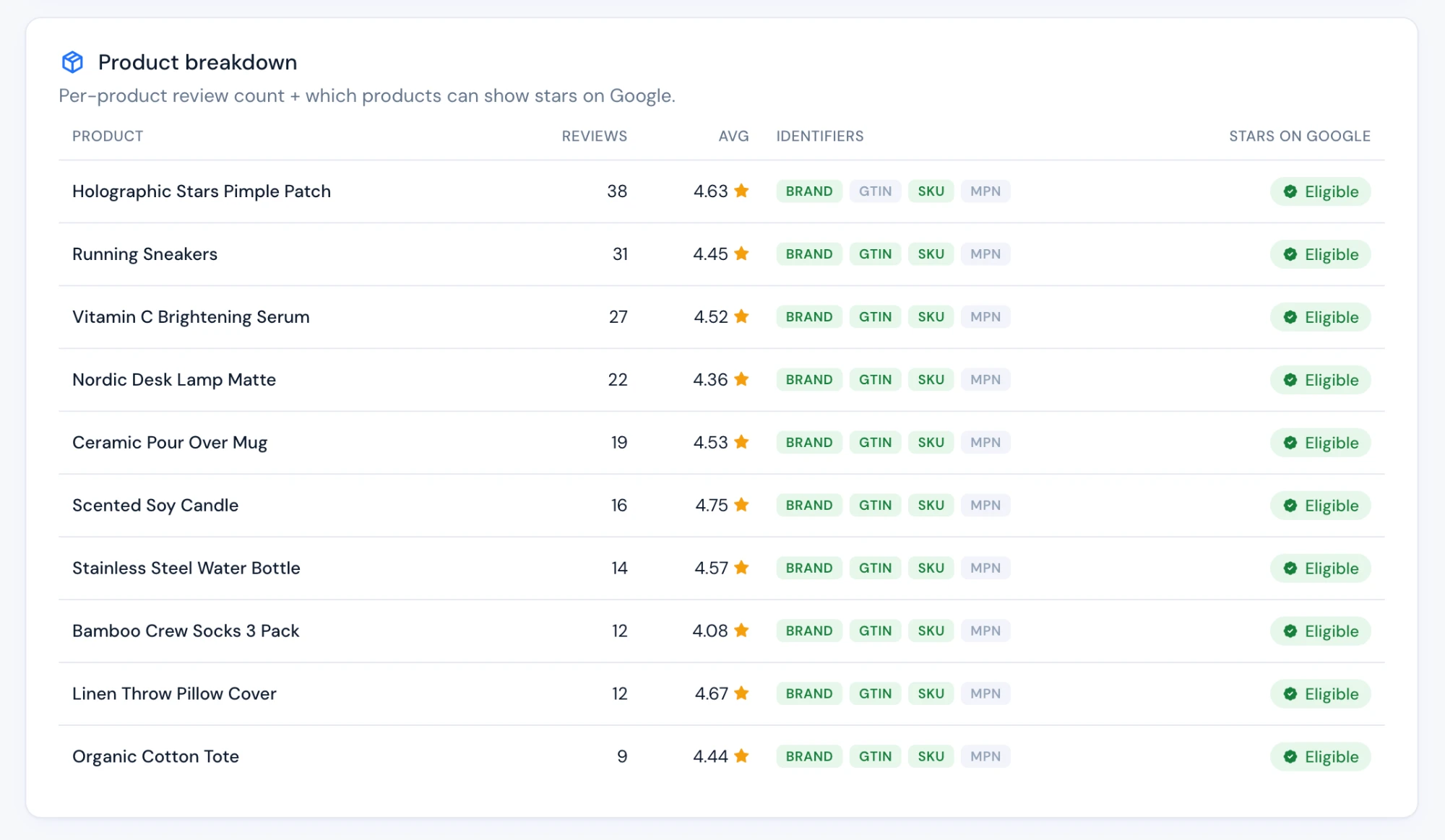
- A clear view of which products are eligible for stars, so you know exactly where you stand
- The same conversion engine as review2xml.com under the hood, so the feed meets Google's format every time
What Happens After You Connect
The setup is a one time job, but the value shows up over the weeks that follow. Because the app stays connected to your review source, every new review you collect flows through to Google without another export. If a product drops below Google's requirements or an identifier is missing, the eligibility view shows you where the gap is, so you can fix the right product instead of guessing. And because the app pushes straight to Google Merchant Center, you are not maintaining a feed URL or re-uploading a file each time your catalogue changes. In practice you set it up once and your Google Shopping stars keep themselves current.
Pricing
The app follows the same simple pricing as the website. You can start free for up to 50 reviews, then move to a paid plan when you need more: 6 dollars per month or 59 dollars per year. There is no long onboarding and no contract, so you can try it on a small catalogue first and scale up when the stars are live.
Want the fastest route to star ratings on Google Shopping? Install the Review2XML app from the Shopify App Store, or start on the web at review2xml.com. Both get you to the same place: reviews on Google, minus the manual work.
Who Should Use the App vs the Website
If you run your store on Shopify and want the least amount of setup, the app is the easy choice, because it connects your reviews and Google Merchant Center directly inside your admin.
If you are not on Shopify, or you prefer to keep things on the web, review2xml.com does the same conversion and gives you a feed you can hand to Google yourself. The two share the same engine, so the resulting stars are identical.
FAQ
Do I need to be on Shopify to use Review2XML? No. The app is for Shopify stores that want the simplest setup, but review2xml.com works for any store and produces the same Google ready feed.
Which review apps connect automatically? Judge.me, Yotpo, and a Google Sheets link connect automatically today, and more review platforms are being added. If yours is not connected yet, you can still upload a CSV and get the same result.
How long until my stars show on Google Shopping? Once your reviews are pushed to Google Merchant Center, Google reviews the feed before showing ratings. Approval usually takes a few days, and you need to meet Google's minimum of 50 reviews across your products.
Does the app keep my feed updated automatically? Yes. After you connect a review source, new reviews sync through to Google in the background, so you do not have to export or upload anything again.
What does it cost? You can start free for up to 50 reviews. Paid plans are 6 dollars per month or 59 dollars per year when you need to sync more.
Will the app slow down my store? No. The app runs inside your Shopify admin and works with your reviews and your Google feed. It does not add scripts to your storefront, so it has no effect on the speed shoppers experience on your site.
Can I keep using my current review app? Yes. Review2XML does not replace Judge.me, Yotpo, or whichever app collects your reviews. It takes the reviews you already collect and gets them onto Google Shopping, so the two work together.
I already use the review2xml.com website. Should I switch to the app? If your store is on Shopify, the app is more convenient, because it connects your reviews and Google Merchant Center directly in your admin. If your current setup already works and you are happy handing Google the feed yourself, there is no need to change. Both use the same engine.
Found this helpful? See more of our guides on Google.
Add as preferred source on Google