
How We Rebuilt Review2XML to Handle Stores With 2,000+ Products and 40,000+ Reviews
I build Review2XML on my own, and most of what I know about scale I learned from real stores pushing the tool past where I first designed it. This is the story of one of those moments: the day a store with more than 2,000 products and over 40,000 reviews signed up, everything technically "worked," and yet the result was clearly wrong. Here is what broke, how I found it, and why the tool now handles large catalogs that would quietly choke a lot of feed tools.
I am writing this partly as a build log and partly because it is the honest proof behind a claim I make often: if you run a big Shopify catalog and you want stars on Google Shopping, this is a problem we have actually solved, not one we hope we can handle.
The Store That Broke My Assumptions
Most Shopify stores that use Review2XML have a few dozen to a few hundred products. My early design quietly assumed that shape. Then a store came in with over 2,000 live products and tens of thousands of reviews syncing in, and the cracks showed up immediately.
The feed generated. The dashboard loaded. No error message anywhere. But when I looked at the store's product view, most of the products were blank: no image, no price, just a name. For a merchant opening the tool for the first time, that looks broken, and a tool that looks broken on first open does not earn trust no matter what the XML says.
That is the trap with scale. Nothing throws an exception. The tool just silently does a smaller version of its job and reports success.
What Actually Went Wrong
I will keep this at the level of what happened, not a line by line of the internals, because the mechanics are not the interesting part. The interesting part is the pattern.
The tool was only ever looking at the beginning of a very large catalog. On a store with a few hundred products, "the beginning" and "the whole catalog" are the same thing, so I never noticed. On a store with thousands of products, the tool was reading the first slice, filling in what it could, and treating the rest as if it did not exist. The reviews on products further down the catalog had nowhere to attach, and the product cards for those items came back empty.
So the fix was not a patch. It was a change in assumption: stop treating a catalog as a short list you can read in one pass, and start walking the entire catalog no matter how long it is, all the way to the last product. Once I did that, the blank cards filled in and the reviews landed on the right products across the whole store, not just the top of it.
If there is a lesson for other builders reading this, it is that "works on my test store" and "works on a 2,000 product store" are two different claims, and only the second one matters to the merchant who has the 2,000 product store.
The Harder Problem: Identifiers at Scale
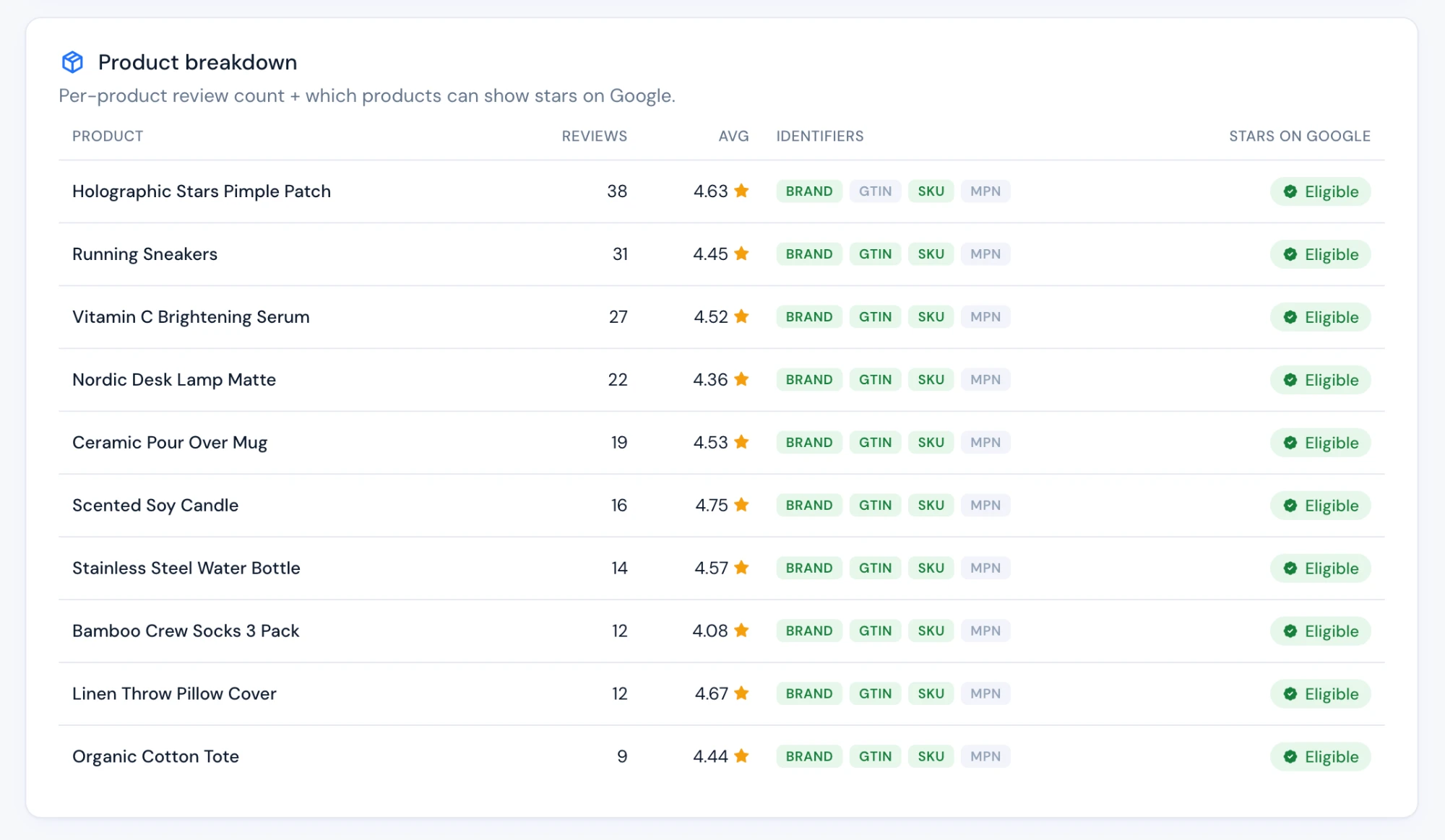
Getting every product to show up was only half of it. The part that actually decides whether stars appear on Google is the product identifiers: the codes that tell Google exactly which product each review belongs to.
On a small catalog you can eyeball this. On a catalog of thousands of products, sourced from a review platform and a spreadsheet feed and a Shopify export that each carry slightly different information, the gaps are everywhere. One product has a barcode but no brand. Another has a brand and an internal code but no barcode. A third has nothing but a product page URL.
A feed tool that just copies whatever it is given will leave most of those products ineligible for stars and never tell you. What I wanted instead was for the tool to fill the gaps intelligently: to take whatever a product already had, then quietly complete the missing identifiers from the other information available for that exact product, without ever overwriting something the store had set on purpose. That is the piece that turns "the feed generated" into "the feed will actually earn stars," and it is the difference that matters on a large branded catalog where thousands of reviews are sitting there waiting to count.
I am not going to hand over the recipe for how the gap filling works, because that is genuinely the hard-won part. But the outcome is simple to state: a big catalog now comes out the other side with far more of its products correctly identified than it went in with.
A Mistake I Made, and How I Caught It
Here is the part most tools would never write about. While I was improving the identifier handling, I shipped a version of the logic that was a little too eager. It was meant to touch one specific type of connection, but the way I wrote a single check made it apply more broadly than intended, and for a small number of stores it changed how their feed was built.
The reason it did not become a disaster is boring and deliberate: I watch real feeds. I do not ship a change to how feeds are generated and walk away. I check the actual output for real stores afterward, and that is how I caught this within the day, traced it to the one over-broad check, and corrected it so it only affected the connections it was ever meant to. Then I added a guard so that class of mistake cannot repeat.
I am telling you this because "we handle large catalogs" is easy to type on a pricing page. What actually backs it up is that when something goes sideways on a big store, someone notices quickly and fixes it, rather than the merchant discovering months later that their stars quietly stopped. On a one person tool, that discipline is the product.
Where Things Stand Now
Today, a Shopify store with more than 2,000 products and over 40,000 reviews syncs into Review2XML, every product shows up with its image and price, the reviews attach to the correct products across the entire catalog, and the identifiers get completed so the branded products are actually eligible to show stars on Google. It runs on a schedule, so it stays current as the catalog and the reviews change.
That is the whole point of writing this down. Large catalogs are exactly where feed tools tend to fall over quietly, and it is exactly the case we went out of our way to make solid, using a real store that pushed us there.
Running a large Shopify catalog and want stars on Google Shopping? Start free at review2xml.com and see your whole catalog, not just the first slice of it, turned into a Google ready review feed.
FAQ
How many products and reviews can Review2XML handle? Stores with more than 2,000 products and over 40,000 reviews run through it today. The tool reads the entire catalog rather than a sample of it, so catalog size is not the limiting factor it is with many feed tools.
Why were my product images or prices missing before? On very large catalogs, a tool that only reads the start of the catalog will leave the rest of the products blank. Review2XML now walks the full catalog, so every product comes back with its image, price, and reviews attached, not just the first few hundred.
Do I need clean product identifiers on every product myself? No. Review2XML fills the gaps for you, completing missing identifiers for a product from the other information available for that same product, without overwriting anything you set deliberately. That is what makes a large branded catalog eligible for stars instead of leaving most products invisible to Google.
Does it keep working as my catalog changes? Yes. The sync runs on a schedule, so as you add products and collect reviews, the feed stays current without you re-exporting anything by hand.
Is this only for big stores? No. Small stores were always fine. This work was about making sure large catalogs are just as reliable, so the same tool serves a 50 product store and a 2,000 product store equally well.
Found this helpful? See more of our guides on Google.
Add as preferred source on Google