Black Friday 2026: Google AI Now Recommends "Top-Rated" Products. Are Yours?
Every year I watch store owners spend weeks on Black Friday. Meta ads, email flows, landing pages, the perfect discount. Then the week before, they search for their own product on Google and see a competitor sitting there with 4.8 stars and 1,200 reviews, while their listing shows nothing.
This year that gap matters more than ever, because Google is starting to let shoppers buy straight from its AI. And when you watch how that AI picks products, the first word it uses is "top-rated".
Google now shows "top-rated options" and lets shoppers buy right there
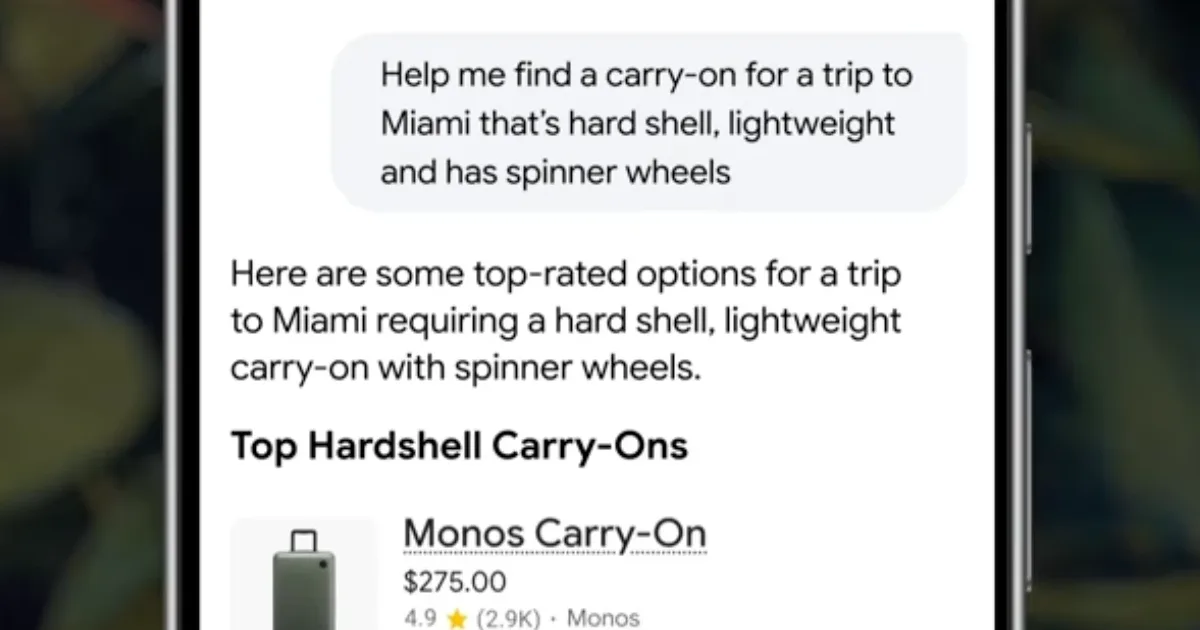
Shopify published a short video showing the buyer experience in Google AI Mode. A shopper types a normal request: help me find a carry-on for a trip to Miami that is hard shell, lightweight and has spinner wheels.
Screenshot from Shopify's video Google AI Mode: Buyer Experience. Click the image to watch it.
Look at what the AI says before it shows a single product: "Here are some top-rated options." Then the very first product appears with its price, its store and its rating: 4.9 stars from 2,900 reviews.
The AI did not open with "here are some cheap options" or "here are some new options". It opened with top-rated, and it put the star rating right under the product name. That is the shortlist the shopper sees, and it is built around reviews.
Watch it in action: Google AI Mode: Buyer Experience on Shopify's YouTube channel. It shows the whole flow, from the shopper's question to the top-rated picks to buying without leaving Google.
Customers might never visit your store
Here is the part most merchants have not caught up with yet. According to Shopify's help center, the Google AI Mode and Gemini channel lets customers buy your products in a Shopify checkout without leaving the conversation. They click Buy, add shipping and payment, and the order lands in your Shopify admin.
A few facts worth knowing, straight from that page:
- It is rolling out gradually to eligible stores through Shopify's agentic storefronts, so it may not be live on your store yet.
- Shoppers need to be in the United States, Canada or Australia. Your store can be based anywhere.
- Your products need to be in Google Merchant Center, which most stores do with the free Google & YouTube app.
- There are no extra fees beyond normal payment processing.
Put that together with the screenshot above. The shopper asks, the AI answers with top-rated products, the shopper buys inside the answer. Your product page, your banners and your Black Friday popup never get a chance. What the shopper sees is your title, your price, your image and your stars. If you have no stars, you are competing against products that do.
Where do those stars come from?
The ratings in Google's shopping results, ads, free listings and AI answers come from Google's Product Ratings data. Merchants send that data to Google Merchant Center as a product reviews feed.
Your review app shows reviews on your own store, which is great. But on most plans those reviews never reach Google. Judge.me, Loox, Yotpo and most other review apps keep the Google feed behind their higher paid tiers. So plenty of stores have hundreds of happy reviews that Google simply cannot see.
I wrote more about how this works in AI answers in Google AI Overviews and product reviews.
To be honest about the limits: sending your reviews to Google does not guarantee the AI will pick your product. Google decides that, and it uses a lot of signals. What reviews do is make your products eligible to show stars. Without them, you cannot show a rating at all, and the AI has one less reason to call your product top-rated.
Why you need to start this week, not on Black Friday
Black Friday is November 27 and Cyber Monday is November 30. The catch is timing. The first time you send reviews to Google, it usually takes 2 to 4 weeks before stars start showing. Google needs to review your feed, match each review to the right product, and turn Product Ratings on for your account.
If you start this week, your stars have a real chance to be live for the Black Friday and Cyber Monday rush, and they will definitely be ready for the December holiday shopping. If you wait until the week of Black Friday, you miss the whole season.
Your Black Friday checklist for Google stars
- Google Merchant Center synced with your products. Install the free Google & YouTube app and turn on automatic product sync.
- At least 50 product reviews in total. This is across your whole store, not per product. After that, a product needs at least 3 reviews for its stars to show on Shopping ads.
- Product Ratings turned on in Merchant Center, so your account is eligible to show stars.
- Product identifiers on your products. A GTIN (barcode), or SKU, or brand plus MPN. Google uses these to match each review to the right product.
- A product reviews feed sent to Google. You have three ways to do it:
- A sync tool like Review2XML. Enter your store URL and it pulls your reviews from Judge.me, Loox, Yotpo, Okendo, Stamped, Junip, Reviews.io or Trustpilot, with no API key needed for most stores. You can also connect with an API key, or upload a CSV export. It then keeps the feed updated every day.
- A paid plan on your current review app that includes Google Shopping sync.
- Export your reviews as a CSV and convert them to Google's XML format yourself. It is free, but it needs some technical work and you have to repeat it to keep new reviews flowing.
One more tip for Black Friday itself: your BFCM buyers are probably the biggest batch of new customers you will get all year. Make sure your review requests are switched on, so those orders turn into reviews in December. That is often what takes a store past the 50 review minimum.
Get your stars live before the rush
You already put the work into collecting reviews. This is the step that lets Google, and Google's AI, actually see them. You can start free at review2xml.com, and your first 50 reviews cost nothing to sync.
Want to measure this on your own store? Review2XML's Google Shopping stats show clicks, impressions and click-through rate for your store and each product.
FAQ
Can customers really buy my products inside Google AI Mode? Yes, for eligible stores. Shopify is rolling out direct checkout in Google AI Mode and Gemini through its agentic storefronts. Shoppers in the United States, Canada and Australia can buy without leaving Google, and the order comes into your Shopify admin like any other.
Do product reviews affect which products Google's AI recommends? Google does not publish exactly how it picks products. But in Shopify's own demo the AI describes its picks as "top-rated options" and shows a star rating and review count under each one. Sending your reviews to Google makes your products eligible to show those stars.
How long does it take for stars to show on Google Shopping? Usually 2 to 4 weeks after you send your first reviews feed. After that, new reviews usually show within 7 to 10 days.
How many reviews do I need? At least 50 product reviews in total across your store, and at least 3 on a product for its stars to show on Shopping ads.
Do I need to upgrade my review app? Not necessarily. Many review apps keep the Google feed on a paid plan, but a sync tool like Review2XML can send your existing reviews to Google from Judge.me, Loox, Yotpo, Okendo, Stamped, Junip, Reviews.io and Trustpilot.
Found this helpful? See more of our guides on Google.
Add as preferred source on Google